 
 Main Menu
|
|
Nevada Classics
|
|
Advertise at CC
|
| S |
M |
T |
W |
T |
F |
S |
| |
1 |
2 |
3 |
4 |
5 |
6 |
| 7 |
8 |
9 |
10 |
11 |
12 |
13 |
| 14 |
15 |
16 |
17 |
18 |
19 |
20 |
| 21 |
22 |
23 |
24 |
25 |
26 |
27 |
| 28 |
29 |
30 |
|
|
|
|
|
|
CC Advertisers
|
|

05-31-2008, 11:29 AM
|
 |
6th Generation Texan

|
|
|
Join Date: Feb 2002
Location: Devil's Backbone,RR 32,
TX
Cobra Make, Engine: Lone Star Classics #240,Candy Apple Red,Keith Craft 418w - 602 HP,584 TQ
Posts: 8,157
|
|

 Not Ranked
Ron,
This one is just 81.3 kb and some think it is still too big. 
 |
05-31-2008, 11:30 AM
|
 |
Super Moderator
|

|
|
Join Date: May 2001
Location: Fresno,
CA
Cobra Make, Engine: KMP 184/482ci Shelby
Posts: 14,448
|
|
Not Ranked
1. Google Adobe Photoshop.
2. Download the free Photoshop Elements.
3. Make a "duplicate" of your picture, and then "resize" it. 640X480 of about 100-150kb is a good size for posting here. You can use larger sizes and higher resolutions for your gallery, but use the smaller size for use in posts.
Folks will tell you to use some online service to either park your pic or to resize them yourself. Seems to me that anyone serious enough to get a CSX ought to learn how to do it for themselves. Elements will serve 90% of your needs for fixing your pics for home use as well...red eye, resizing for e-mails or printing, etc. BTW, I always lighten my pics a little for the internet, which tends to darken them.
You are most welcome.
__________________
Jamo
|
05-31-2008, 12:51 PM
|
 |
Senior Club Cobra Member
|
|
|
Join Date: Dec 2001
Location: Shasta Lake,
CA
Cobra Make, Engine:
Posts: 26,619
|
|
Not Ranked

Or you could read the stickies at the top of this forum which explains and shows the size and space you have for pictures in the gallery.
Edit: This was not meant to be sarcastic as I thought that if you looked at the posts on the gallery you may be able to see the limits and how to post and understand it easier.
Ron
Last edited by Ron61; 05-31-2008 at 06:01 PM..
|
05-31-2008, 12:52 PM
|
|
CC Member
|
|
|
Join Date: Apr 2008
Location: Scottsdale,
Az
Cobra Make, Engine: Black CSX 4910, Roush 511 8 stack
Posts: 1,206
|
|
Not Ranked
They are now posted in the gallery under csx 4910. The powertoy download for windows xp was a lot easier than photoshop. I just forgot to rename them before attaching but they are there.
Thanks
Ron
Last edited by csx4910; 05-31-2008 at 01:00 PM..
|
05-31-2008, 12:59 PM
|
|
Super Moderator
|
|
|
Join Date: May 2001
Location: Fresno,
CA
Cobra Make, Engine: KMP 184/482ci Shelby
Posts: 14,448
|
|
Not Ranked
Ron...glad you figured out how to do it for yourself, regardless of what tool you used. Any further issues, PM me.
Ron61...I just don't know what we'd do without you. 
__________________
Jamo
Last edited by Jamo; 05-31-2008 at 01:11 PM..
|
05-31-2008, 01:17 PM
|
|
Super Moderator
|
|
|
Join Date: May 2001
Location: Fresno,
CA
Cobra Make, Engine: KMP 184/482ci Shelby
Posts: 14,448
|
|
Not Ranked
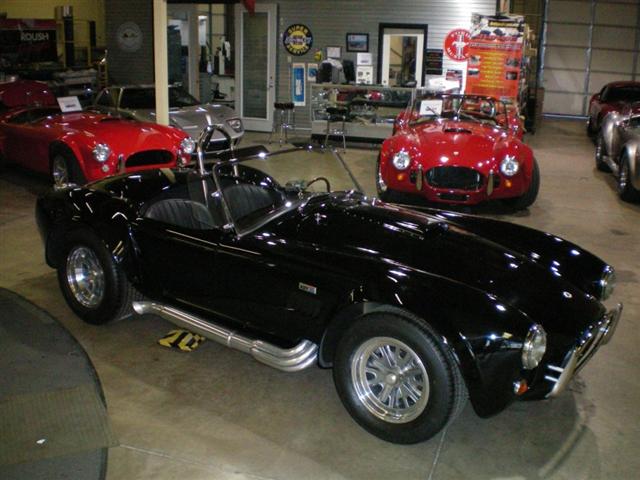
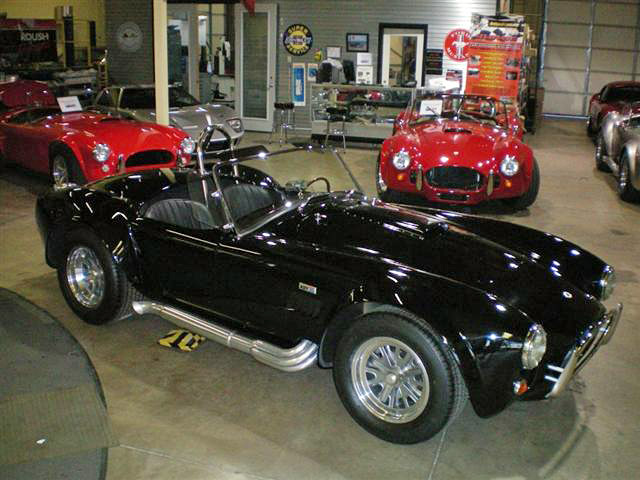
Ron...took a look at your pics. Again, use whatever tool you want, but Photoshop Elements (used by a few billion first, second and third worlders) would allow you to downsize while keeping good quality. I note that your last posted pic is only about 50kb, probably because the XP tool didn't give you the choice on resolution. When you downsize and then save the copy on elements, you can adjust the resolution independently...again, 100-150kb is pretty good for a 640X480 size. Also, a little lightening can help when posting on the internet or e-mailing pics.
Here's your pic at 50kb...
Here's your pic after I lightened and sharpened it up a bit and saved it at 150kb. Now, that's working from the small/low res pic you uploaded. The results are even more pronounced if doing the same types of things from the original high res. Just trying to help...ignore it if you don't have any further interest.
__________________
Jamo
Last edited by Jamo; 05-31-2008 at 01:39 PM..
|
 Posting Rules
|
You may not post new threads
You may not post replies
You may not post attachments
You may not edit your posts
HTML code is Off
|
|
|
All times are GMT -7. The time now is 08:09 AM.
Links monetized by VigLink
|
















 Linear Mode


